Rusty Windows: Building a PyO3 project on Windows
Zack M Williams, 11th August 2026

So to prefix this post - I am a proud macOS user. I also have a lot of experience with Linux distros, particularly Debian-based ones. I used Windows when I was younger, but the last Windows computer I owned ran Windows 8, and I ended up deleting it and replacing it with Ubuntu.
Over the years I have used Windows less and less. I have also not written much software for it. My switch from Windows to Linux/Mac coincides with the start of my learning to program professionally. Since much of this involved high performance scientific software, that runs almost exclusively on Linux, the need to use Windows quickly diminished.
Needless to say, I am not a Windows user and I become increasingly frustrated when using it as the UI has seemingly become less intuitive as the years go by.
More recently, some projects I have worked on have been calling out for Windows support. So I decided to try implement support for a project, thinking that it would take next to no work. I was wrong!
Python Packaging
The project of interest was the xmlgenerator, specifically the pyxmlgenerator Python wrapper. I wanted to publish it to the Python package index, which requires building the project and pushing it to the registry.
Python package distributions are usually two files, a source distribution (sdist) and a wheel (whl).
Essentially, the sdist is a .tar.gz file containing all the source files for the package.
Whereas, the wheel is a binary distribution format.
For pure Python projects, the wheel is platform-independent containing .py files alongside project metadata.
For projects containing Python extensions (e.g. C library, PyO3 Rust bindings), a wheel is platform dependent, since it includes compiled versions of the libraries.
Therefore, for these cases the wheel must be built for all platforms and architectures that the package supports.
Actually, it is not necessary to provide wheels for all platforms, but if no wheel is provided, then pip will use the sdist to compile the binary files.
As this is essentially the same as building the wheel, then, even if the target wheel is not provided, checking that it can be built from the source distribution is necessary to ensure the package works on a given platform.
So if we are going have to build it anyway, then publishing the wheel seems logical.
Code differences
When I started, I expected some compiler errors, a couple of issues with paths, and maybe a line ending problem. I found all of these, but as these were expected, fixing them was relatively simple. Getting to the point where my code was compiling was the real challenge...
libxml2-rs
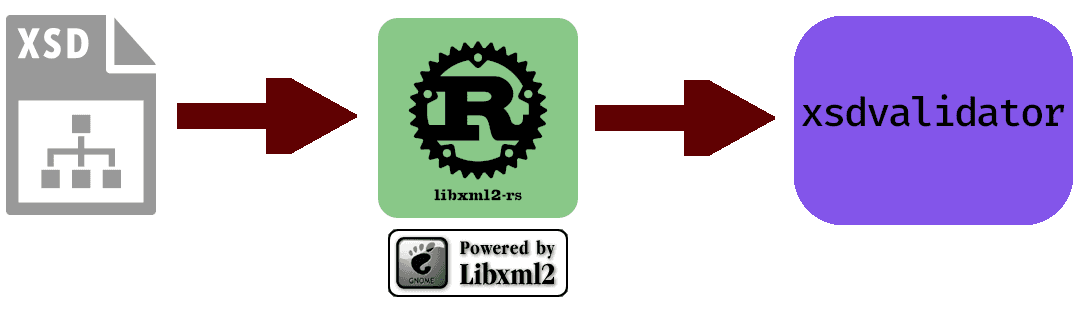
The xmlgenerator crate includes xsdvalidator which depends on libxml2-rs, which ultimately depends on the libxml2 C library.
Building libxml2-rs on Windows, and in particular on one of GitHub's Windows action runners, presented several issues.
Firstly, installing libxml2. On Windows, the recommended method is to use a package manager such as vcpkg.
This part was easy:
vcpkg install libxml2
but time consuming, so I setup a github actions cache to avoid having to build the library multiple times for each architecture:
- name: Setup vcpkg libxml Cache
  if: contains(matrix.os, 'windows')
  uses: actions/cache@v4
  id: vcpkg-cache
  with:
    path: C:\vcpkg
    key: vcpkg-libxml2
CMake
The libxml2-rs library builds the C interface using CMake to find libxml2 and build the tests. Generally speaking, to build a CMake project using vcpkg, I would run:
cmake -B build -S . -DCMAKE_TOOLCHAIN_FILE="${VCPKG_ROOT}/scripts/buildsystems/vcpkg.cmake"
This would use the vcpkg.cmake toolchain file to pass all necessary directories and libaries to CMake, without any additional information.
However, in this case I was not calling CMake directly, I was using cargo build and calling CMake using the Rust cmake crate.
Therefore, I could not pass CMAKE_TOOLCHAIN_FILE directly, but set it as an environment variable:
$vcpkg_root = $Env:VCPKG_INSTALLATION_ROOT # = C:\vcpkg for GitHub Runners
$Env:CMAKE_TOOLCHAIN_FILE = "$vcpkg_root\scripts\buildsystems\vcpkg.cmake"
On a GitHub runner, to ensure this environment variable persists between steps, it must be passed to the GITHUB_ENV variable, using:
$toolchain = "$vcpkg_root\scripts\buildsystems\vcpkg.cmake"
Write-Output "CMAKE_TOOLCHAIN_FILE=$toolchain" >> $env:GITHUB_ENV
Now the library should build as expected, right? Right?
build.rs
Unfortunately, these environment variables were not passed to CMake correctly and did not make it to the build step.
Instead CMake returned Could NOT find LibXml2 (missing: LIBXML2_LIBRARY LIBXML2_INCLUDE_DIR).
To ensure that the CMAKE_TOOLCHAIN_FILE variable is always passed to CMake, I added the following to my build.rs file:
use cmake::Config;
use std::env;

fn generate_config() -> Config {
    let mut config = Config::new("libxml2_interface");

    if let Ok(cmake_toolchain_file) = env::var("CMAKE_TOOLCHAIN_FILE") {
        config.define("CMAKE_TOOLCHAIN_FILE", cmake_toolchain_file);
    }

    if let Ok(out_dir) = env::var("OUT_DIR") {
        config.out_dir(out_dir);
    }

    config
}
This function explicitly adds CMAKE_TOOLCHAIN_FILE to the CMake config if the environment variable is set.
This fixed the Could not find LibXml2 error during the config phase, but resulted in the following error during the build phase:
libxml2_interface/wrapper.h:4:10: fatal error: 'libxml/parser.h' file not found
Include files
My original build script looked for libxml2 include files in /usr/include/libxml2, which worked fine on macOS/Linux.
I therefore added a new environment variable LIBXML2_INCLUDE_DIR, using
# For x64 windows (locally)
$include_dir = "$vcpkg_root\installed\x64-windows\include\libxml2\"
$Env:LIBXML2_INCLUDE_DIR = $include_dir
or in a GitHub workflow:
Write-Output "LIBXML2_INCLUDE_DIR=$include_dir" >> $env:GITHUB_ENV
I then added the following to my build.rs file:
fn fetch_include_path() -> Option<String> {
    if let Ok(lib_path) = env::var("LIBXML2_INCLUDE_DIR") && Path::new(&lib_path).exists() {
            return Some(lib_path.to_string());
    }

    let lib_path = "/usr/include/libxml2";
    if Path::new(lib_path).exists() {
        return Some(lib_path.to_string());
    }

    None
}
This function searches for an environment variable LIBXML2_INCLUDE_DIR; if it is set, and the path exists, then it is passed to the bindgen builder, using:
builder.clang_arg(format!("-I{}", lib_path))
This fixed the header file errors, but a further error arose during linking...
Linking
The original build.rs file included the line:
println!("cargo:rustc-link-lib=xml2");
This told the linker to look for a libxml2 library file to link libxml2-rs to.
However, the error I now got stated that it could not find a library xml2.lib to link to.
It turns out that the above print statement need to be amended to:
println!("cargo:rustc-link-lib=libxml2");
Which tells the linker to look for a file named libxml2 explicitly, rather than the lib prefix being implicit.
Adding this to the line breaks the macOS/Linux build, so we require:
#[cfg(not(target_os = "windows"))]
println!("cargo:rustc-link-lib=xml2");
#[cfg(target_os = "windows")]
println!("cargo:rustc-link-lib=libxml2");
This preserves the standard behaviour unless the target operating system is Windows.
However, while this fixes the issue of looking for an incorrectly named file, it does not fix the problem of finding the file.
Therefore, similar to the include directory, we require an environment variable LIBXML2_LIBRARY_DIR, using:
# For x64 windows (locally)
$lib_dir = "$vcpkg_root\installed\x64-windows\lib\"
$Env:LIBXML2_LIBRARY_DIR = $lib_dir
or (GitHub Action):
Write-Output "LIBXML2_LIBRARY_DIR=$lib_dir" >> $env:GITHUB_ENV
Adding the following to my build.rs file,
fn fetch_library_path() -> Option<String> {
    if let Ok(lib_path) = env::var("LIBXML2_LIBRARY_DIR") && Path::new(&lib_path).exists() {
            return Some(lib_path.to_string());
    }

    None
}
the library location can be passed to the linker using:
if let Some(lib_path) = fetch_library_path() {
    println!("cargo:rustc-link-search={}", lib_path);
}
After this, libxml2-rs builds correctly. The full build.rs file can be viewed here.
Testing
Now that cargo build runs successfully, I just have to run the tests then I can push the fix to ... the tests don't compile!
Instead of compiling, I get and error about the signature of a function structured_error_handler in my test case.
This function needs to match the type xmlStructuredErrorFunc defined in the libxml2 bindings file.
On macOS/Linux, this type is defined as:
use std::ffi::c_void;

pub type xmlErrorPtr = *mut xmlError;

pub type xmlStructuredErrorFunc = ::std::option::Option<
    unsafe extern "C" fn(userData: *mut c_void, error: xmlErrorPtr),
>;
Where xmlErrorPtr is a mutable pointer to a Rust struct xmlError.
My structured_error_handler function had the signature:
extern "C" fn structured_error_handler(user_data: *mut c_void, error: xmlErrorPtr);
which seems to match the above.
However, on Windows, I got the error:
error[E0308]: mismatched types
   --> src\lib.rs:107:26
    |
107 |                     Some(structured_error_handler),
    |                     ---- ^^^^^^^^^^^^^^^^^^^^^^^^ types differ in mutability
    |                     |
    |                     arguments to this enum variant are incorrect
    |
    = note: expected fn pointer `unsafe extern "C" fn(_, *const _xmlError)`
                  found fn item `extern "C" fn(_, *mut _xmlError) {structured_error_handler}`
Apparently, on Windows, the xmlErrorPtr type expects is a constant pointer to xmlError rather than mutable.
After discovering this, I had a slight existential crisis, but recovered enough to write a new function signature:
unsafe extern "C" fn structured_error_handler(
    user_data: *mut c_void,
    #[cfg(not(target_os = "windows"))] error: *mut xmlError,
    #[cfg(target_os = "windows")] error: *const xmlError,
 );
This fix allowed the tests to build but naturally, they failed to run. (Not failed during running, failed to run)
Rather than the tests running, I get an error about a dll not being found.
As it turned out, the vcpkg bin directory was not in my PATH variable.
Adding it to the environment fixed the problem locally:
# x64
$bin_path = "$vcpkg_root\installed\x64-windows\bin\"
$Env:PATH = "$PATH;$bin_path"
However, on GitHub runners, the path variable is defined using a file with location GITHUB_PATH.
On macOS/Linux, this can be done simply using,
echo "$my_path" >> $GITHUB_PATH
but this syntax doesn't work for Windows, instead the command is:
"$bin_path" | Out-File -FilePath "$env:GITHUB_PATH" -Append
Which appends $bin_path to the end of the file at $env:GITHUB_PATH.
After fixing this issue, libxml2-rs runs correctly and I was able to publish the crate using cargo publish.
xmlgenerator
Now that libxml-rs works, I can return to xmlgenerator. For this, I created a new script setup-windows.ps1 which handles all the directories for Windows. With this and a few minor fixes, mostly similar to issues found with libxml2-rs, the project built correctly.
The only new problem was with path variables.
I had used std::fs::canonicalize to get the canonical, absolute path to files on Unix systems.
However, for Windows, this converts the path to extended path syntax, which breaks comparisons to paths not using this syntax.
I therefore converted all absolute paths to use this syntax for compatibility.
Use of this function has no effect on absolute paths on macOS/Linux.
Fixing these issues enabled the tests for xmlgenerator and allowed the crates to be published.
pyxmlgenerator
I thought I had fixed all issues with xmlgenerator, but after building it with uv, I ran into an issue with importing a .dll file when importing pyxmlgenerator:
ImportError: DLL load failed while importing pyxmlgenerator: The specified module could not be found.
I double checked my PATH variable and tried various fixes to no avail.
It turns out that this is a well documented problem and Python 3.8 provided a
fix by providing the function os.add_dll_directory to the os module.
See this thread for a discussion of this problem.
The following script fixed the issue:
import os

# On Windows systems, Python uses DLL paths when resolving
# dependencies in Python extension modules, see:
# https://docs.python.org/3/library/os.html#os.add_dll_directory
if os.name == "nt":
    for path in os.environ["PATH"].split(";"):
        try:
            os.add_dll_directory(str(path))
        except FileNotFoundError:
            pass
However, since this is a Python function, it must be called when pyxmlgenerator is initialised.
Audit wheel
After all this, the uv build command prints the following warning:
⚠️ Warning: Your library requires copying the above external libraries. Re-run with `--auditwheel=repair` to copy them into the wheel.
However, Python's auditwheel package is only for macOS/Linux wheels. Fortunately, delvewheel provides similar functionality for Windows. Running:
uv pip install delvewheel
$wheels = Get-ChildItem -Path dist -Recurse -Include *.whl
uv run delvewheel repair $wheels
Creates fully consolidated wheels on Windows.
Conclusion
I have a created several GitHub Actions which port the xmlgenerator project to Windows. I have published the binaries to PyPI which can be downloaded using:
pip install pyxmlgenerator
As it turns out, porting to Windows is much more complicated than imagined. If only the OS wasn't so bloated!
PS: I have not yet been convinced to become a Windows user.